ServiceM8 how-to
How do you give clients their test and tag records on a QR code?
Put each client site's current test and tag register and test reports in a Google Drive folder shared as view only, make a QR code of the link in Chrome, and stick the label in the site office or beside the first aid kit. The client's staff and auditors scan it to see the latest register, without asking you for it.
Last checked 2 Nov 2026 against the sources listed at the end of this page.
There is no built in client facing register link in ServiceM8. A shared Google Drive folder per site, behind a QR label, gives clients the current register in one scan.
Step by step
- Make a Google Drive folder for the client site, named with the client and site, for example Example Industries Depot 2.
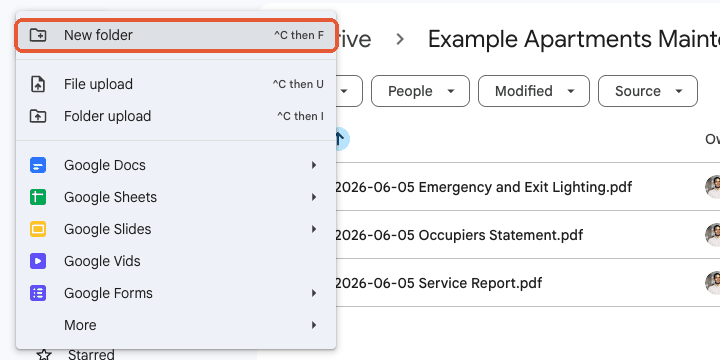
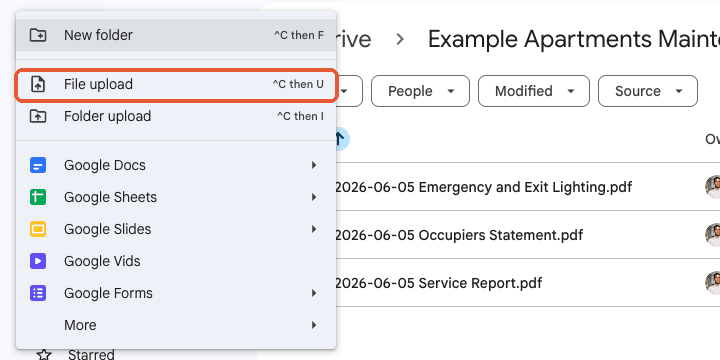
- Upload this round's register and test reports with New, File upload, naming the register by the round it covers.
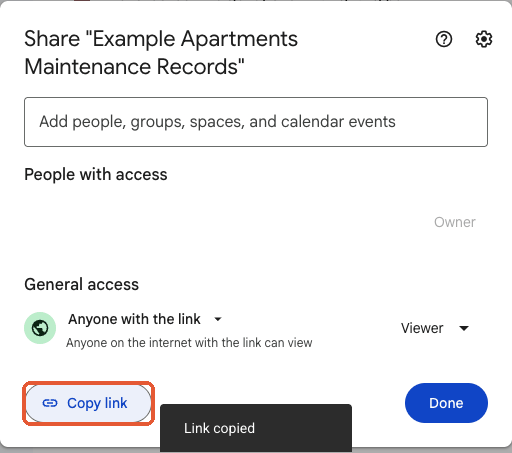
- From the folder name menu choose Share, set General access to Anyone with the link as Viewer, and click Copy link.
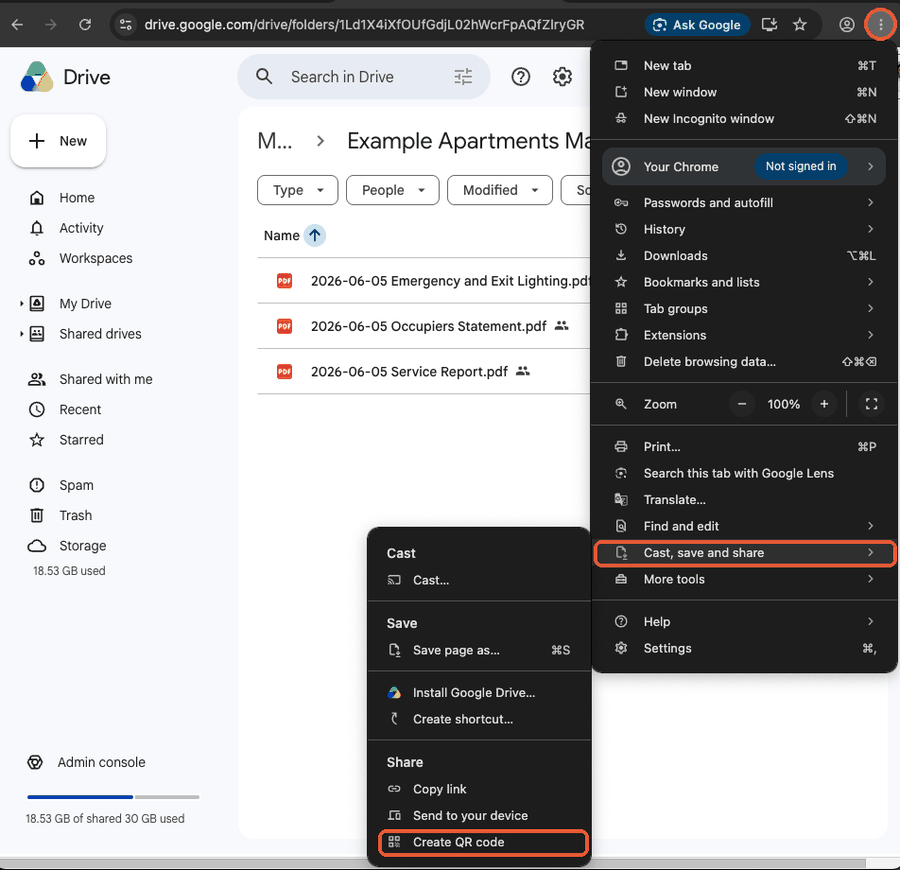
- Open the link in Chrome, choose Cast, save and share, then Create QR code from the three dot menu, and Download the code.
- Print it on a label with the site name and Scan for test and tag records, and fix it in the site office or beside the first aid kit.
- At each retest, upload the new register and move the old one into an Archive subfolder. The label stays the same.
Gotchas
- Test results can name staff and show failed items. Check the client is comfortable with anyone on site seeing the register before you put the label up.
- Never share the client's parent folder. One shared folder per site keeps each label to that site's equipment.
- Skip QR websites that offer free codes with scan tracking. Many stop working when the trial ends, and the labels go dead in your clients' offices.
- A folder in a departed technician's Google account disappears when the account is removed. Use a business account you control.
What the official help article misses: Google's sharing article covers Anyone with the link and the Viewer role, but not a folder per client site behind a QR label, archiving old rounds, or keeping the parent folder private. Read ServiceM8's article.
Why clients ask for it
A tag on a lead tells you about one appliance. The questions clients get asked are about all of them: a safety auditor wants the register, a head contractor wants proof before a crew goes on site, and a new site manager wants to know what is due. Every one of those turns into an email to you asking for the latest PDF.
A label in the site office that opens the current register answers the question before it reaches you. For a test and tag business, that is fewer admin emails and a small, visible reason for the client to stay with you at the next retest.
What the register needs to show
In Queensland, the Electrical Safety Regulation 2013 prescribes what a tag or written record must hold after equipment is tested, including the test or retest date or the date it is next due, and the tester's name or licence number. Your register PDF already carries these if it comes from a proper test and tag form, so the folder just has to hold the current one.
Retest intervals in Queensland are set by work type, from 6 monthly for some manufacturing equipment to yearly for service work and up to 5 yearly for office equipment. Many clients have a mix, so name the register by the round it covers, for example 2026-11 Register.pdf, and keep the previous rounds in an Archive subfolder rather than deleting them.
One folder per site, not per client
A client with three depots wants three labels, each opening that depot's register. Make a folder per site, share each one separately, and keep a parent folder per client for your own filing that is never shared. That way a label at one depot never exposes another depot's equipment or results.
Keeping it current
The folder is only as good as the last upload. Make replacing the register part of closing each retest job: export the register, drop it in the site folder, and move the old one to Archive. If you run test and tag in ServiceM8, the per site Asset Register PDF from Asset Management is the file to upload.
Sources
- Under Queensland's Electrical Safety Regulation 2013, the prescribed details for a tag or written record after testing include the test or retest date or the date the equipment must next be retested, and the tester's name or electrical contractor or worker licence number. Queensland Legislation, checked 2 Nov 2026.
- Queensland's Electrical Safety Regulation 2013 sets test intervals by work type: at least yearly for equipment used in service work, up to every 5 years for equipment used only for office work, and 6 monthly or yearly for manufacturing work depending on insulation. Queensland Legislation, checked 2 Nov 2026.
- With General access set to Anyone with the link, anyone who has the link can open a Google Drive folder without signing in, and the Viewer role lets them open every file in it. Google Drive Help, checked 2 Nov 2026.
- Chrome on a computer makes a QR code for the open page from the More menu, under Cast, save and share, then Create QR code, with a Download option. Google Chrome Help, checked 2 Nov 2026.